
Ai Coding Agent
For several years now, AI has been a constant companion for most programmers; we witness the daily emergence of fast, professional tools that leverage AI to enhance workflows—each adding unique capabilities that significantly boost output quality. However, discovering, testing, and integrating these specific features into a project often consumes a great deal of time. This is where agent-based programming tools come into play; they enable you to achieve top-tier results rapidly and cost-effectively (minimizing token usage). One of the latest examples is Commodore, a tool that consolidates hundreds of essential infrastructure components and thousands of curated skills, transforming your model from a “hallucinating” or dim-witted one into a highly intelligent, sharp performer.
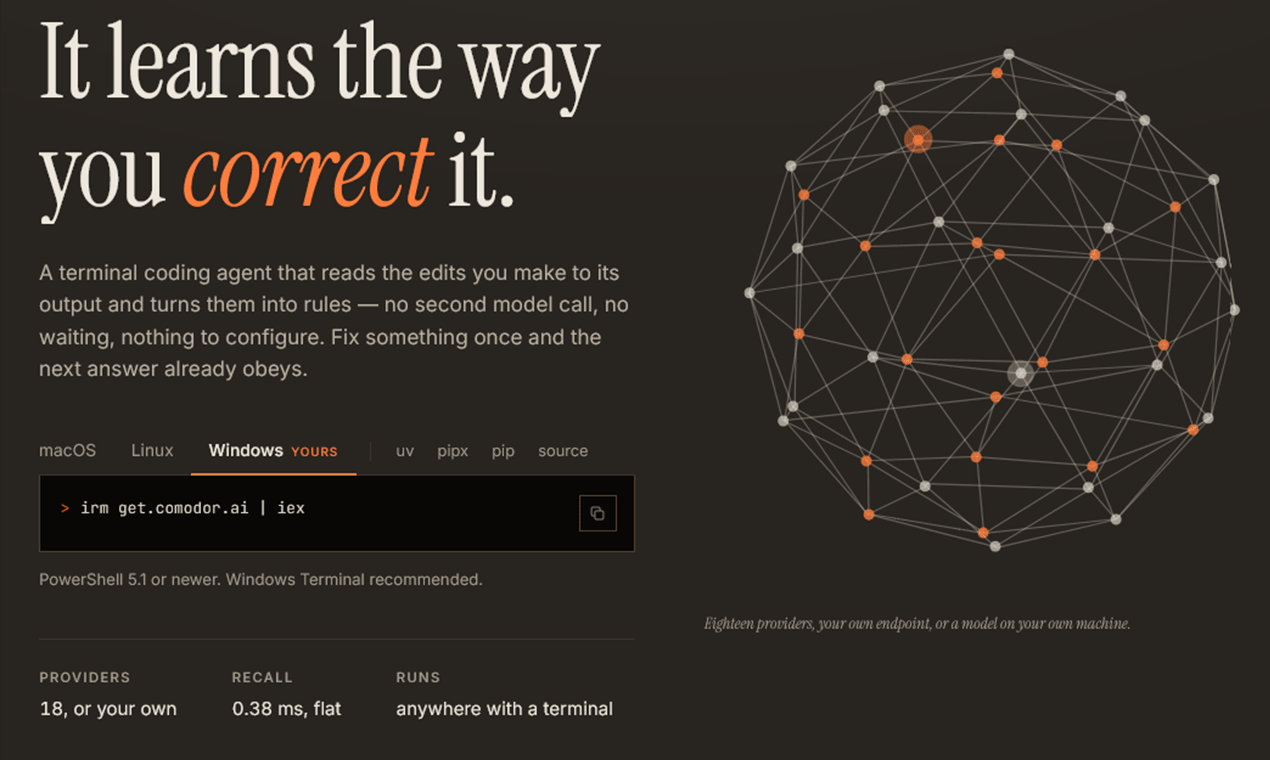
Every AI coding agent on the market today shares one quiet flaw: it forgets. You correct the same formatting mistake on Monday, and again on Friday, because the correction went into a conversation that ended. Comodor starts from the opposite premise. It is a self-improving AI coding agent — a terminal-first coding assistant that turns each of your corrections into a permanent, reusable lesson, and then shows you the numbers that prove it learned.
In this review we look at what Comodor does, how its learning engine works in practice, how it handles safety and cost, where it runs, and — just as important — where its own documentation says it falls short. The short version: an open-source, MIT-licensed tool that installs in one line, works with 16 hosted providers or fully local models, and treats your corrections as the most valuable training data you have.
Contents
What Is Comodor?
Comodor describes itself as “the coding agent that stops making the same mistake.” The promise is concrete: “Fix something it wrote, and it never writes it that way again — in this project or the next one. Not a setting you turn on. Not a file you maintain.” That last sentence is the whole pitch in miniature. There is no rules file to curate and no prompt template to babysit — the learning is the product, not a feature you configure.
Under the hood it is a Python-based terminal coding agent with a Rich-powered interface. It reads your code, writes edits, runs commands, browses the web, and can drive your desktop — but it asks before it acts, and every write is checkpointed and reversible.
The engineering restraint is unusual: “Installing Comodor pulls in rich and nothing else.” The HTTP client, the SSE reader, the Chrome WebSocket, and the PNG encoder are all hand-written rather than imported. Installation is one line, which the project says it verified on a bare debian:bookworm-slim with nothing installed. You can even run comodor --demo to explore the entire interface offline — no key, no account, no signup wall.
Comodor is open source under the MIT license, and the full code and documentation live on GitHub.
The Learning Engine: What Makes a Self-Improving AI Coding Agent
The core insight is simple and a little blunt: “Praise is cheap and corrections are expensive, so corrections are what it learns from.” When you edit a file Comodor wrote, or simply tell it that it was wrong, that event becomes a lesson — a short rule with a confidence score that rises each time the rule holds, and decays when it goes unused.
Learning runs on two lanes. The first, called reflex, is free, immediate, and always on — no model call, no tokens. It includes rules read from your existing code when a session starts, prefetch (recall starts while you are still typing), and one-line announcements whenever a rule is applied. That last detail matters more than it sounds: “a rule you cannot see is a rule you cannot correct.” The second lane, reflection, makes one model call after a task finishes. It can be pointed at a cheaper model, or switched off entirely.
You can also teach deliberately: /teach we use pytest, never unittest plants a rule directly, and /good and /bad give explicit feedback on a turn. Even denying a permission prompt teaches it — “a refusal is the clearest preference signal the interface collects.”
Two commands make the system inspectable. /memory lists every lesson with its confidence — Use single quotes for string literals. [style 91%] is a real example from the docs — and /rules shows the house rules it inferred from your codebase. Lessons live in a local SQLite database and decay with a 45-day half-life by default, so stale habits fade on their own.
The proof is /progress. It shows the corrections-per-task trend with sparklines and hard outcomes — “Corrections per task down 100% since the first tasks in this project,” or a brain of “7 rules · 812 lessons · 24 corrections learned from” — because, as the project puts it, “A number, not a claim.” It is also honest in the other direction: if the correction rate is not falling, the panel says so rather than hiding it. That falsifiability is the difference between a genuinely self-improving AI coding agent and a marketing line.
Hands-On in the Terminal
Typing comodor opens a two-screen interface with 29 slash commands, and cycling F3 switches between three modes: act (the default), plan, and chat. Plan mode is genuinely read-only — “enforced at the permission layer, not by asking the model nicely” — and chat mode is a plain conversation with no tools at all.
One detail we appreciated: ambiguity is handled before code is written, not after. Comodor reads your code first, and if a request could read two ways, it puts up “one short form — three or four questions, answered in about fifteen seconds.” A small thing that prevents a lot of wrong-file edits.
The terminal carries personality without getting in the way: four themes, right-to-left text support, and !command passthrough for dropping to a raw shell. For bigger jobs, the delegate command runs a sub-agent in an isolated git worktree — no memory, no screen access — so parallel work cannot step on yours. Everything works headless too: comodor run "fix the failing test" --yes executes one task with no interface, --json gives machine-readable output, and — notably — “it still learns from a headless run.”
Safety, Permissions, and the Undo Button
The security model fits in one sentence from the docs: “Reading is silent. Writing shows a diff. Commands ask. Every change is checkpointed and /undo puts it back.” Each of the 13 built-in tools declares a risk tier — read-only tools like grep and glob run silently; write_file and edit_file ask and show a diff; and anything that executes, browses, or drives the desktop asks explicitly.
Approval prompts offer [a] allow, [A] allow for the rest of the session, and [d] deny — and [A] is per-kind, not global: allowing writes does not allow commands, and allowing pytest does not allow rm. Because every written file is checkpointed first, /undo restores the last change no matter how it was approved. The docs call this “the reason /approve all is a reasonable thing to do.”
Some commands are refused outright, before any prompt appears: rm -rf /, mkfs, dd if=, shutdown, fork bombs, chmod -R 777 /, format c: — and the list is extensible in your config.
Two boundary decisions stand out. First, the agent may only touch files inside your project folder, and only you can relax that. Second, a cloned repository’s config file is an allow-list, not a deny-list: a repo can pick a theme or a model, but it can never set safety options — “A repository cannot change any of the above.” API keys live in an owner-only config file or the environment, never appear in logs, transcripts, or tracebacks, and key-shaped text is redacted on sight.
A Real Browser, and Real Desktop Control
The browse tool is “not a page fetcher.” It drives a browser that is actually installed on your machine — Chrome, Chromium, Edge, or Brave; nothing is downloaded — in its own profile, headless by default. It “runs JavaScript, keeps cookies, and can log in,” and it reports pages as “a numbered list of the controls actually on screen” rather than a blob of pixels. It can attach to your own logged-in Chrome session for tasks that need your accounts, and it speaks the Chrome DevTools Protocol over a hand-rolled WebSocket — with, again, no new dependency.
The computer tool goes further: mouse and keyboard in any application, not just the browser. Before the pointer moves, a halo appears where it is about to click; the pointer travels there over about a third of a second, and a ripple marks where the click landed. The docs are explicit about why: “The pause is not decoration. It is the moment in which you can still stop it.” Moving the mouse into a corner of the screen is the kill switch, and it works even while the agent holds the pointer.
Screen access is deliberately hard to grant. It takes two deliberate steps, comes in time-boxed grants (/computer 15m, /computer 1h this app), is checked before every single action, and is never saved to config — there is no “always allow” for your screen. Password managers, 2FA windows, crypto wallets, online banking pages, locked screens, and Comodor’s own window are always refused. Text is typed by character rather than key position, so it is correct on every keyboard layout.
One honest limit, stated plainly in the docs: desktop control is Windows-only so far — the macOS and Linux backends are not written yet.
Costs, Caching, and Running for Free
Comodor treats cost as something you measure, not something you hope about. The headline number: “86% of input tokens served from cache, measured — not estimated.” A sample /cost readout in the docs shows 84,210 prompt tokens, 72,418 of them served from cache, $0.1904 spent and $0.4126 saved. The design choice behind it is clever: nothing dynamic lives in the system prompt, because caching needs a byte-identical prefix, so recalled lessons ride along with each turn instead — a change the project says took measured hit rates from 72% to 87%.
Every task runs under ceilings: $2.00 of spend by default, a one-hour wall-clock limit, and — deliberately — no step limit, because “a step count has no relationship to harm.” There is even honesty about the ceiling itself: “a spend limit only works for a model with a published rate,” and when it cannot be enforced, Comodor tells you so instead of letting you believe you are protected.
And there is a $0 path. Comodor runs on Ollama, LM Studio, or its own built-in local runtime — comodor local get qwen2.5-coder-7b-q4 downloads a model with resume and SHA-256 verification, after which it “keeps working with the network unplugged.” The docs are equally honest about the ceiling of local models: a 14B coder model is genuinely usable for day-to-day work; the difference shows up on long multi-step tasks.
Beyond the Terminal: Web, Phone, Editor, Docker
The same agent — with the same learned lessons and the same transcripts — is reachable from more surfaces than we can list in a paragraph, so here is the map:
| Surface | How you reach it | What it gives you |
|---|---|---|
| Terminal (TUI) | comodor | 29 commands, act/plan/chat modes, and a full offline demo via --demo |
| Web UI | comodor web | The same agent in a browser tab, sessions shared with the terminal, token-authenticated on localhost |
| Headless CLI | comodor run "task" --yes | One task, no interface, JSON output — and it still learns |
| Local API | comodor serve | An OpenAI-compatible chat completions endpoint on your own machine |
| Telegram | comodor telegram start | A working bot in about a minute, the whole interface as buttons, read-only until you say otherwise |
| Slack | Socket Mode | About five minutes, no public address to arrange, answers in threads |
| Discord | comodor discord start | About three minutes, one token, allow-listed servers and DMs |
| Meta Cloud API | Works, but the docs are honest: the high-effort channel, about twenty minutes | |
| Editors | ACP protocol | Drives from Zed, VS Code, and JetBrains panels; Neovim, Emacs, and more reported working |
| MCP servers | stdio or Streamable HTTP | External MCP tools appear next to the built-ins, behind the same permission gate, with no new dependencies |
| GitHub | comodor github connect | A GitHub App that reads issues, PRs, and CI and opens PRs on repos you never cloned — writes off by default, never to the default branch |
| Docker | docker run ifekri/comodor:latest | The agent, a real Chromium, git, and ripgrep in one container — dropped privileges, non-root |
All messaging channels are read-only by default until you explicitly turn writes on for them. The reasoning is exactly right: approving a write “with a thumb, on a phone, in a queue” is riskier than approving it at a keyboard, so the default is the safer one.
Model Support: 16 Providers, Local Models, or Any URL
Comodor supports 16 hosted providers with one key each — OpenRouter (one key, hundreds of models, with OAuth sign-in), Anthropic, OpenAI, Google Gemini, DeepSeek, xAI, Mistral, Groq, Cerebras, Moonshot, Z.AI, Qwen, Together AI, Fireworks, Xiaomi MiMo, and B.AI — plus three local runtimes (Ollama, LM Studio, and its own built-in one), plus literally anything with an OpenAI-compatible base URL. A /gw gateway can route each turn by cost, speed, or quality, and steps past a provider that fails three times in a row. On top of that sits a library of 147 ready-to-install skills for longer procedures.
Strengths and Honest Limitations
What impressed us most:
- Learning with receipts.
/progressreports the corrections-per-task trend falling — a number, not a claim. - Safety as gates, not vibes. Diffs before writes, checkpoints plus
/undo, per-kind approvals, hard-refused commands, and an allow-list for repository config. - Measured cost control. An 86% measured cache hit rate and per-task spend ceilings, with honest warnings when a ceiling cannot be enforced.
- One dependency. Everything else is hand-written, which keeps the supply chain small.
- Open source, MIT. The whole thing is auditable on GitHub.
And the limitations the project itself states:
- Desktop control is Windows-only so far; the macOS and Linux backends are not written.
- WhatsApp is the high-effort channel — about twenty minutes, a Meta app, a public HTTPS address, and a 24-hour reply window. The docs’ own advice: if it does not have to be WhatsApp, use Telegram.
- Browser screenshot understanding and desktop control need a vision-capable model; most open models cannot see.
- Local models have a ceiling on long multi-step tasks, and Docker containers get no screen control — a container has no display.
A project that documents its own limits this plainly is easier to trust than one that claims to do everything.
Getting Started
Installation is one line. On macOS, Linux, or BSD:
curl -fsSL get.comodor.ai | shOn Windows PowerShell:
irm get.comodor.ai | iexOr, if you prefer: uv tool install comodor, pip install comodor, pipx install comodor, or Docker:
docker run --rm -it -p 127.0.0.1:8765:8765 -e ANTHROPIC_API_KEY -v "$PWD:/work" ifekri/comodor:latestThen type comodor to start, comodor --demo to explore offline before connecting any model, and comodor doctor to health-check your setup. The first run asks six questions — once — and never again. The project’s benchmark methodology is public too: 13 tasks on 13 real repositories, three attempts each, with results reported as rates rather than single-run booleans.
Ready to try it? Head to comodor.ai, or read the source at github.com/ifekri/Comodor.
Frequently Asked Questions
Is Comodor free?
Comodor is free and open source under the MIT license. You pay only for the model tokens you consume, and the measured 86% cache hit rate keeps that down. Run it on a local model and the total is $0.
Does it work offline?
Yes. With a local model from Ollama, LM Studio, or the built-in runtime, Comodor keeps working with the network unplugged — no key and no account required. The comodor --demo mode also runs the entire interface offline.
Which AI models does it support?
Sixteen hosted providers, including OpenRouter, Anthropic, OpenAI, Google Gemini, DeepSeek, and xAI; three local runtimes; and any OpenAI-compatible endpoint. The /gw gateway routes each turn by cost, speed, or quality.
Is it safe to give an AI agent shell access?
Comodor tiers every tool by risk, shows a diff before any write, asks before anything executes, refuses destructive commands outright, works only inside your project folder, and checkpoints every change so /undo can restore it. Plan mode is read-only at the permission layer, not by request.
How is it different from other AI coding tools?
It learns. Corrections become persistent lessons with confidence scores, /progress shows the corrections-per-task trend falling — a number, not a claim — and those lessons follow you across the terminal, web, phone, editor, and headless runs.
Is my data private?
Lessons and rules live in a local SQLite database — nothing leaves your machine. API keys live in an owner-only config file or the environment, never in logs or transcripts, and key-shaped text is redacted automatically.
Verdict
The AI coding tool category is crowded, and most of it treats every session as day one. Comodor’s bet is that your corrections should compound: the same note you leave a human colleague once should not need repeating to your tooling forever. In our time with it, that bet is backed by unusually disciplined engineering — one dependency, permission gates that are real rather than cosmetic, cost numbers that are measured rather than estimated, and documentation that states limitations as plainly as features.
If you correct your AI the way you correct people, Comodor is the self-improving AI coding agent that finally remembers. Install it in one line, try comodor --demo offline, and watch your corrections-per-task curve start to fall. The source is on GitHub.